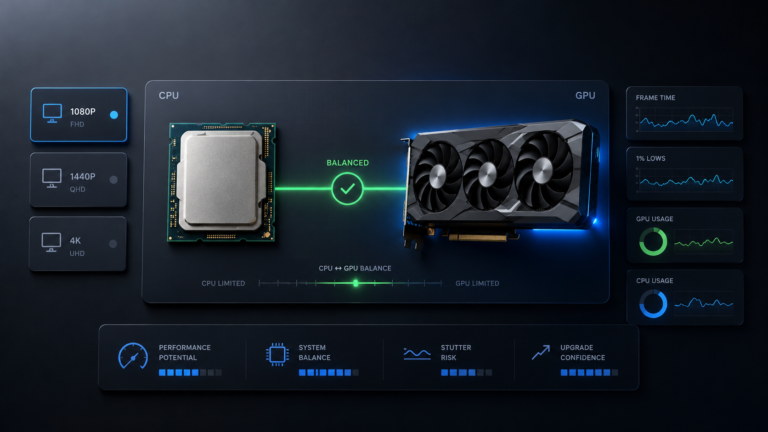
The 7800X3D is one of the strongest gaming CPUs available, so it rarely limits a modern GPU at 1440p or 4K. That flips the usual question: instead of asking what your CPU can handle, you pick the GPU that matches your resolution, refresh rate, and budget.
The AMD Ryzen 7 7800X3D is still one of the best gaming CPUs you can build around, sitting just behind newer chips like the Ryzen 7 9800X3D. Its 3D V-Cache makes it so efficient at feeding a graphics card that, at 1440p and 4K, the GPU is almost always the part doing the limiting, which is exactly what you want. So the real decision is not whether your CPU is fast enough, but which GPU gives you the performance you will actually use. You can check any combination with the free CPU and GPU bottleneck checker before you buy.
2026 context: the GPU landscape now includes NVIDIA’s RTX 50-series (RTX 5090, 5080, 5070 Ti, 5070) and AMD’s RX 9070 XT alongside the still-excellent RTX 40-series and RX 7000 cards. DLSS 4 Multi-Frame Generation is exclusive to RTX 50-series GPUs; the 40-series supports DLSS 3 Frame Generation. All of these pair cleanly with the 7800X3D, so the choice comes down to resolution and value.
Quick Verdict: Best GPU for Ryzen 7 7800X3D
The best GPU for a Ryzen 7 7800X3D depends on resolution. For 1440p high-refresh, the RTX 5070 Ti, RX 9070 XT, or RTX 4070 Ti Super are strong sweet-spot picks. For 4K, step up to the RTX 5080, RX 7900 XTX, RTX 4080 Super, or the flagship RTX 5090 / RTX 4090. For 1080p high-refresh, an RTX 5070 or RX 7800 XT is plenty. The 7800X3D is rarely the limiting part at 1440p or 4K.
Any bottleneck language in this guide is a directional estimate under typical gaming conditions, not an exact measurement. Real results depend on the GPU, game engine, resolution, refresh rate, settings, ray tracing, DLSS/FSR, RAM speed, drivers, thermals, and background apps.
Why the Ryzen 7 7800X3D Can Handle High-End GPUs
Before the GPU renders a frame, the CPU prepares it: game logic, physics, AI, and the draw calls that tell the GPU what to draw. A bottleneck appears when the CPU cannot finish that work before the GPU is ready for the next frame, so the GPU waits. The 7800X3D is unusually good at avoiding that. Its Zen 4 cores carry strong IPC, but the defining feature is 3D V-Cache: an extra slab of L3 stacked on the die, bringing the total to 96MB. Games reuse the same scene and simulation data constantly, and when more of it fits in that large cache, fewer requests go to slower system RAM, so each frame is prepared faster and more consistently.
The practical result is that at 1440p and 4K, where each frame takes the GPU longer to render, the 7800X3D comfortably stays ahead of even flagship cards. A useful rule while you test: 95–99% GPU usage during gaming is normal and healthy. Consistently low GPU usage during FPS drops is the warning sign of a CPU limit, and with this CPU that mostly happens only at 1080p with extreme frame-rate targets.
Best GPU for Ryzen 7 7800X3D by Resolution
Resolution decides how much work lands on the GPU versus the CPU, so it is the most important factor in your choice.
Best 1080p GPU for Ryzen 7 7800X3D
At 1080p the GPU finishes frames quickly, so this is the one place the 7800X3D can become the limiter, usually only in esports titles pushing 240Hz+. A mid-range card like the RTX 5070, RTX 5060 Ti (16GB), or RX 7800 XT is plenty; spending on a flagship here mostly buys headroom you cannot use.
If competitive 1080p high-refresh is your goal, being slightly GPU-bound is actually the more stable place to be. To understand the mechanics, see why 1080p exposes CPU limits.
Best 1440p GPU for Ryzen 7 7800X3D
1440p is the 7800X3D’s sweet spot. The GPU does enough per-frame work that the CPU is rarely the limit, so you can pair a strong card and use all of it. The RTX 5070 Ti, RX 9070 XT, and RTX 4070 Ti Super are excellent 1440p matches, with the RTX 5070 Ti widely seen as the best value here.
For high-refresh 1440p (144–240Hz) these cards push triple-digit frame rates in most titles, and DLSS or FSR extends that further. See how 1440p changes bottleneck results for resolution-specific behavior. Favor 16GB of VRAM for 1440p longevity.
Best 4K GPU for Ryzen 7 7800X3D
At 4K the GPU does nearly all the work, so the 7800X3D is essentially never the limit. This is where high-end cards earn their price: the RTX 5080, RX 7900 XTX, and RTX 4080 Super handle 4K high settings well, while the RTX 5090 or RTX 4090 target 4K high-refresh and path tracing.
For a deep look at the top of this range, see the Ryzen 7 7800X3D and RTX 4090 bottleneck breakdown, which shows how little the CPU matters at 4K. 16GB or more VRAM is the comfortable target at this resolution.
Best GPU for Ryzen 7 7800X3D by Tier
These tiers move from value pairings up to no-compromise flagships. Treat the balance notes as directional for typical gaming workloads.
RTX 5060 Ti (16GB) / RX 7700 XT / RTX 5070 / RX 7800 XT
Strong 1080p high-refresh and entry-1440p cards. The RTX 5060 Ti 16GB and RX 7800 XT give you 16GB of VRAM and clean 1440p performance in most titles, while the RTX 5070 (12GB GDDR7) adds DLSS 4. None of these stresses the 7800X3D, so every frame they produce is usable.
Best for: 1080p 144Hz+ and 1440p 60–100Hz on a budget.
RTX 5070 Ti / RX 9070 XT / RTX 4070 Ti Super
The sweet spot for this CPU. The RTX 5070 Ti (16GB GDDR7) is widely seen as the smartest 2026 buy, delivering most of an RTX 5080’s gaming performance for less. The RX 9070 XT (RDNA 4, 16GB) is excellent raster value, and the RTX 4070 Ti Super (16GB GDDR6X) remains a great match with strong ray tracing. All three keep the GPU as the limit at 1440p high-refresh.
Best for: 1440p 144–240Hz and entry-level 4K.
RTX 5080 / RX 7900 XTX / RTX 4080 Super / RX 7900 XT
Built for 4K. The RTX 5080 (16GB GDDR7, Blackwell) and RTX 4080 Super (16GB GDDR6X) handle 4K high settings comfortably, while the RX 7900 XTX (24GB) and RX 7900 XT (20GB) offer huge VRAM and strong rasterization value, with Smart Access Memory benefiting AMD-on-AMD builds. The 7800X3D keeps all of them fed at 4K.
Best for: 4K 60–120Hz high/ultra settings.
RTX 5090 / RTX 4090
The flagships. The RTX 5090 (32GB GDDR7) is the fastest consumer GPU; the RTX 4090 (24GB GDDR6X) is its discontinued but still-formidable predecessor. These make sense for 4K high-refresh, path tracing, or heavy creator/AI work. At 1080p or 1440p, much of their power goes unused, so they are a 4K-and-beyond purchase.
Best for: 4K 120–240Hz, path tracing, and professional workloads.
GPU Comparison Table for Ryzen 7 7800X3D
| GPU | VRAM | Best resolution | Balance with 7800X3D | Notes |
|---|---|---|---|---|
| RTX 5060 Ti 16GB | 16GB GDDR7 | 1080p / 1440p | GPU-limited (healthy) | Value 1440p; DLSS 4. |
| RX 7800 XT | 16GB GDDR6 | 1440p | GPU-limited (healthy) | Strong raster value. |
| RTX 5070 | 12GB GDDR7 | 1080p high-refresh / 1440p | GPU-limited (healthy) | DLSS 4; good all-rounder. |
| RTX 5070 Ti | 16GB GDDR7 | 1440p (sweet spot) | Balanced | Best-value high-refresh 1440p. |
| RX 9070 XT | 16GB GDDR6 | 1440p / entry 4K | Balanced | RDNA 4; great raster value. |
| RTX 4070 Ti Super | 16GB GDDR6X | 1440p / entry 4K | Balanced | Strong ray tracing, DLSS 3. |
| RTX 5080 / RTX 4080 Super | 16GB | 4K | GPU-limited (ideal) | High-end 4K without flagship cost. |
| RX 7900 XTX | 24GB GDDR6 | 4K | GPU-limited (ideal) | Huge VRAM; SAM with AMD CPU. |
| RTX 5090 / RTX 4090 | 32GB / 24GB | 4K high-refresh | GPU-limited (overkill below 4K) | Flagship; 4K, path tracing, creator work. |
When a GPU Is Too Weak for the 7800X3D
A GPU is underpowered for this CPU when it caps your frame rate well below your monitor’s refresh while the CPU sits with obvious headroom. Pairing the 7800X3D with an entry-level card like an RTX 4060 or RX 7600 at 1440p/4K wastes a premium processor: the CPU spends time waiting and you paid for cache performance you cannot use.
This is a GPU-bound situation, which is normal at high resolutions but a poor value match for a CPU this strong. If your GPU usage is pinned at 100% and frame rates are low for the games you play, the upgrade you need is the graphics card, not the CPU. Here is how to recognise and address a GPU-limited setup.
When a GPU Is Overkill for the 7800X3D
A flagship like the RTX 5090 or RTX 4090 is overkill if you play mainly at 1080p or 1440p without path tracing. At those resolutions the 7800X3D, and often your monitor, becomes the limit before the GPU is fully used, so you pay for headroom you cannot access. These cards make sense at 4K high-refresh, with path tracing, or for creator and AI workloads.
Overkill is not the same as harmful: a too-powerful GPU still runs everything well, you just overspend. If you mostly play at 1440p, an RTX 5070 Ti or RX 9070 XT typically delivers the experience you want for far less than a flagship.
Example Ryzen 7 7800X3D Gaming Builds
Three balanced starting points. Enable EXPO for DDR5-6000, run dual-channel, and confirm Resizable BAR / Smart Access Memory.
| Build | GPU | RAM | Target & balance |
|---|---|---|---|
| High-refresh 1080p / value 1440p | RTX 5070 or RX 7800 XT | 32GB DDR5-6000 | 1080p 240Hz / 1440p 100Hz; GPU is the limit |
| Sweet-spot 1440p | RTX 5070 Ti or RX 9070 XT | 32GB DDR5-6000 | 1440p 144–240Hz; balanced, GPU-led |
| High-end 4K | RTX 5080 or RX 7900 XTX | 32GB DDR5-6000 | 4K 60–120Hz ultra; GPU-bound (ideal) |
Real performance also depends on the game engine, settings, ray tracing, DLSS/FSR, drivers, and thermals. Treat any single estimate as a guide, then confirm with real GPU usage, CPU usage, and frame time.
Check Your CPU-GPU Balance
The tier guidance here reflects typical gaming workloads. Your real result depends on the games you play and what runs in the background. A CPU-heavy engine, like a dense simulation or large multiplayer title, leans on the processor more than a GPU-bound AAA renderer at the same resolution, and streaming with OBS adds overhead a clean benchmark never sees. The fastest way to sanity-check a pairing is to run your exact parts through the CPU vs GPU bottleneck test at your target resolution, then confirm with monitoring. To know how much to trust any single number, see how accurate bottleneck calculators are.
Final Recommendation
The Ryzen 7 7800X3D pairs well with almost any modern GPU because it rarely limits the card at 1440p or 4K. Match the GPU to your resolution: an RTX 5070 or RX 7800 XT for high-refresh 1080p, an RTX 5070 Ti or RX 9070 XT for the 1440p sweet spot, and an RTX 5080, RX 7900 XTX, or a flagship RTX 5090 / RTX 4090 for 4K. Enable EXPO at DDR5-6000 and confirm Resizable BAR before judging any pairing.
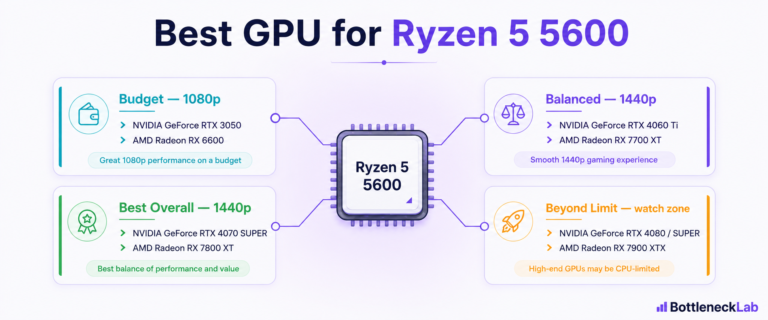
If you already own a 7800X3D, there is rarely a reason to upgrade the CPU for a new GPU at these resolutions, that is the whole appeal of this chip. For a more budget-focused contrast, the best GPU for a Ryzen 5 5600 guide shows how a lighter CPU changes the picture.
Frequently Asked Questions
What is the best GPU for Ryzen 7 7800X3D?
It depends on resolution. For 1440p high-refresh, the RTX 5070 Ti or RX 9070 XT are the value sweet spot, with the RTX 4070 Ti Super a strong alternative. For 4K, step up to the RTX 5080, RX 7900 XTX, or a flagship RTX 5090 / RTX 4090. For 1080p high-refresh, an RTX 5070 or RX 7800 XT is plenty. The 7800X3D rarely limits any of these at 1440p or 4K.
Is RTX 4090 good for Ryzen 7 7800X3D?
Yes, it is an excellent 4K pairing. At 4K the GPU does nearly all the work, so the 7800X3D keeps it fed without becoming the limit. At 1080p or 1440p, though, much of the RTX 4090’s power goes unused, so it is best reserved for 4K high-refresh, path tracing, or creator and AI workloads. Note the newer RTX 5090 now sits above it as the fastest consumer GPU.
Is RTX 4080 Super good for Ryzen 7 7800X3D?
Yes. The RTX 4080 Super (16GB GDDR6X) is a strong high-end pairing for 4K and very high-refresh 1440p. The 7800X3D keeps it well-fed at these resolutions, so you get the full performance you pay for. It is a more sensible value than a flagship unless you specifically want 4K path tracing or the highest possible frame rates.
Is RTX 4070 Ti Super enough for Ryzen 7 7800X3D?
Yes, it is a great match, especially at 1440p. With 16GB of VRAM and strong ray tracing, the RTX 4070 Ti Super handles 1440p high-refresh comfortably and dips into entry-level 4K. The 7800X3D has plenty of headroom to feed it, so the pairing is balanced and the GPU stays the limiting part, which is what you want.
What GPU is overkill for Ryzen 7 7800X3D?
At 1080p and most 1440p gaming, a flagship like the RTX 5090 or RTX 4090 is overkill, because the CPU or your monitor becomes the limit before the GPU is fully used. These cards are worth it only for 4K high-refresh, path tracing, or professional workloads. For pure 1440p gaming, an RTX 5070 Ti usually delivers the experience you want for much less.
What GPU should I pair with 7800X3D for 1440p?
For 1440p, the RTX 5070 Ti or RX 9070 XT are the sweet-spot picks, with the RTX 4070 Ti Super close behind. All three push triple-digit frame rates in most titles at high-refresh 1440p and use 16GB of VRAM, which is the comfortable target at this resolution. The 7800X3D keeps them fed without becoming the bottleneck.
What GPU should I pair with 7800X3D for 4K?
For 4K, pair it with at least an RTX 5080, RX 7900 XTX, or RTX 4080 Super, or a flagship RTX 5090 / RTX 4090 if you want 4K high-refresh and path tracing. At 4K the GPU does almost all the work, so the 7800X3D is essentially never the limit and you get full value from a high-end card. Favor 16GB or more VRAM.
Should I upgrade from Ryzen 7 7800X3D before buying a new GPU?
For 1440p and 4K, no. The 7800X3D is one of the strongest gaming CPUs and rarely limits a modern GPU at those resolutions, so your money is better spent on the graphics card. A CPU upgrade only matters if you chase extreme 1080p esports frame rates or heavy productivity, where newer chips like the 9800X3D pull ahead, and even then mainly at 1080p.