The practical verdict
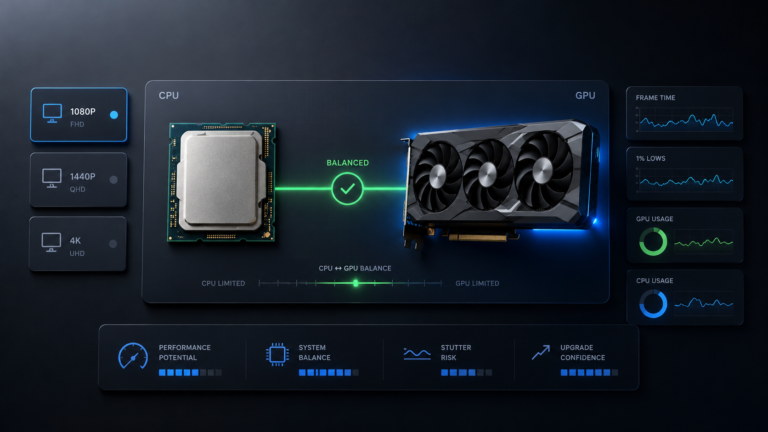
For most gaming builds, the Ryzen 7 7800X3D and RTX 4090 are a sensible high-end pairing. At 1440p and 4K, the GPU usually carries more of the rendering workload. At 1080p or very high refresh rates, CPU-heavy games can expose a CPU-side limit, but that does not automatically make the pairing poor or justify replacing the processor.
The real result depends on the game engine, resolution, refresh-rate target, graphics settings, ray tracing, frame generation, background applications, memory configuration, cooling, power limits, and driver condition.
CPU pressure is easier to expose
Lightweight esports games, simulations, and very high frame-rate targets can make the CPU and game engine more visible.
Usually a strong balance
The GPU takes on more rendering work, although CPU-heavy games can still behave differently from graphics-heavy titles.
The GPU usually carries more load
Demanding graphics settings, ray tracing, and native rendering tend to place the larger burden on the RTX 4090.
What changes at 1080p, 1440p, and 4K?
Resolution changes how much rendering work reaches the GPU, but it does not create a fixed bottleneck percentage. Game design and frame-rate target still matter.
Best understood through your refresh-rate target
The RTX 4090 can complete lower-resolution rendering work quickly. This gives the CPU, game engine, memory system, FPS cap, and monitor refresh rate a larger influence on the final result.
- At normal refresh-rate targets, the 7800X3D is still a strong match.
- Competitive 240Hz or higher targets make CPU limitations easier to expose.
- Simulation-heavy and large multiplayer games can behave differently from graphics-heavy titles.
- A monitor cap or FPS cap may become the practical limit before either component.
A practical resolution for this pairing
At 1440p, the RTX 4090 performs more rendering work per frame than it does at 1080p. This normally reduces the chance that a capable CPU becomes the main limit.
- Graphics-heavy games usually place more pressure on the GPU.
- CPU-heavy games can still expose processor or engine limits.
- Very high refresh-rate targets still need strong CPU-side frame preparation.
- Ray tracing and higher settings generally increase GPU workload.
The RTX 4090 normally carries more of the work
At 4K, the GPU processes substantially more pixel and graphics work. Native resolution, ray tracing, texture settings, and visual quality can make the graphics card the larger performance constraint.
- The 7800X3D remains suitable for high-end 4K gaming.
- The CPU can still influence simulation, AI, draw calls, and 1% lows.
- DLSS and frame generation can change the balance by reducing or restructuring rendering work.
- No resolution makes the CPU completely irrelevant.
| Gaming target | Likely pressure | What to watch | Upgrade implication |
|---|---|---|---|
| 1080p at 144Hz | Mixed, depending on the game | FPS cap, per-core CPU activity, GPU usage, frame time | Keep the 7800X3D unless a repeatable CPU limit prevents your target |
| 1080p at 240Hz or higher | CPU and game-engine pressure becomes more likely | 1% lows, heavily loaded cores, engine limits, monitor capability | Consider a newer CPU only for a confirmed high-refresh need |
| 1440p at 144Hz | Often GPU-heavy, but game dependent | GPU utilization, frame time, graphics settings, CPU cores | A CPU change is rarely the first action |
| 1440p at 240Hz | Mixed CPU and GPU demand | Game type, 1% lows, CPU cores, render scale, ray tracing | Base the decision on the exact games and target FPS |
| 4K gaming | GPU usually carries more rendering load | GPU usage, VRAM, power, thermals, ray tracing, upscaling | A processor upgrade usually has lower priority |
Why the Ryzen 7 7800X3D works well with the RTX 4090
A gaming frame passes through several stages. The CPU handles tasks such as game logic, physics, AI, input processing, world simulation, and draw submission. The GPU then handles rendering, shaders, lighting, ray tracing, and image output.
The Ryzen 7 7800X3D combines eight Zen 4 cores, sixteen threads, and 96MB of L3 cache. The additional cache can help games keep frequently used data closer to the CPU instead of requesting it from system memory as often. The benefit varies by game, but this design is well suited to workloads where low-latency access and consistent frame preparation matter.
AMD’s official specifications list the processor as an AM5 chip with DDR5, two memory channels, EXPO support, and a maximum boost clock of up to 5GHz. You can review the details on AMD’s Ryzen 7 7800X3D specification page .
The 7800X3D prepares the frame
It handles simulation, game logic, AI, input, and draw-call work before the GPU can render the final frame.
Large cache can reduce memory trips
More frequently used game data may remain closer to the processor. The benefit depends on the engine and workload.
The RTX 4090 renders the frame
It handles graphics work through its Ada Lovelace architecture, 24GB of GDDR6X memory, ray-tracing hardware, and rendering features.
Frame delivery depends on the whole system
RAM, cooling, drivers, storage activity, background apps, BIOS settings, and the game itself can affect consistency.
These specifications explain why the RTX 4090 can expose CPU or engine limits at lighter rendering loads. They do not provide a universal bottleneck percentage for every game.
Check NVIDIA’s official RTX 4090 specificationsWhere CPU-side pressure can still appear
Even a strong processor can become the current limit under the right conditions. That does not mean the CPU is weak. It means the workload has shifted away from graphics rendering and toward frame preparation or game simulation.
Competitive 240Hz or higher gaming
Generating more frames places more frequent demands on the CPU, memory system, game engine, and input pipeline.
Simulation-heavy engines
Strategy games, large multiplayer scenes, dense AI, physics, crowds, and world simulation can create CPU-side pressure at any resolution.
Lower settings or render resolution
Reducing graphics settings can make the GPU finish sooner, shifting the practical limit toward the CPU or engine.
Recording, browsers, launchers, and utilities
Background applications can use CPU time, memory, storage, or GPU resources and reduce available headroom.
Memory running below its intended profile
Disabled EXPO, unstable settings, single-channel operation, or limited memory capacity can affect CPU-side consistency.
Throttling or restrictive power behaviour
High temperatures, poor airflow, power-saving modes, or firmware settings can reduce sustained CPU or GPU performance.
Check for an FPS cap, V-Sync, menu screen, game-engine cap, loading sequence, shader compilation, power-saving mode, thermal throttling, driver problem, or background task before buying hardware.
Frame time and 1% lows matter more than a bottleneck percentage
Average FPS shows how many frames were produced across the complete test. It does not show whether those frames arrived evenly. A system can report a high average while still feeling uneven because of occasional frame-time spikes.
Overall throughput
Useful for broad comparisons, but it can hide short slowdowns and inconsistent frame delivery.
Slower moments
Helps show how the system behaves during heavier scenes rather than only reporting the overall average.
Delivery consistency
A steady graph usually feels smoother than a graph with repeated spikes, even when the average FPS looks similar.
CPU pressure that averages can hide
Overall CPU usage may look modest while one or more important game threads are heavily loaded.
A stronger diagnosis uses several signals together
When those signals point in the same direction across repeated tests, the diagnosis is much more useful than a calculator percentage on its own. Read how accurate bottleneck calculators are before treating any estimate as a benchmark.
Should you upgrade beyond the Ryzen 7 7800X3D?
Keep the Ryzen 7 7800X3D unless testing shows a repeatable CPU-side limit in the games, settings, and frame rates you actually use. A newer model may be faster in some CPU-sensitive conditions, but that does not make the 7800X3D unsuitable for the RTX 4090.
AMD now offers newer Zen 5 X3D processors, including the Ryzen 7 9800X3D and Ryzen 7 9850X3D. Those chips are relevant when building a new premium system or chasing the highest possible CPU-side gaming performance. Existing 7800X3D owners should compare the complete upgrade cost with the practical improvement in their own workload.
Most existing RTX 4090 owners
- You mainly play at 1440p or 4K
- Your target frame rate is already reached
- Frame time and 1% lows are stable
- The GPU remains well used in demanding scenes
- You would need to spend heavily for a small practical change
Specific high-refresh or new-build cases
- You are building a new system rather than upgrading an existing one
- You target very high refresh rates in CPU-heavy games
- Repeated tests confirm CPU-side frame-time pressure
- Your monitor and game can use the additional frames
- The total upgrade cost fits the expected benefit
| CPU path | What it offers | Who it suits | Reason not to change automatically |
|---|---|---|---|
| Ryzen 7 7800X3D | Eight Zen 4 cores, sixteen threads, 96MB L3 cache | Existing high-end gaming systems | Already a strong match for RTX 4090 gaming at common high-end resolutions |
| Ryzen 9 7950X3D | Sixteen cores and thirty-two threads with X3D technology | Gaming combined with heavily threaded productivity | Extra cores do not guarantee a better gaming result in every title |
| Ryzen 7 9800X3D | Newer Zen 5 architecture and second-generation 3D V-Cache design | New premium gaming builds and confirmed CPU-sensitive targets | An existing 7800X3D may already meet the required performance |
| Ryzen 7 9850X3D | A newer high-end Zen 5 X3D option | Buyers prioritizing maximum CPU-side gaming headroom | The cost and benefit should be checked against the actual workload |
How to set up the platform correctly
A premium CPU and GPU cannot compensate for unstable memory, outdated firmware, poor airflow, an unsuitable power supply, or a loose power connection. Check the complete system before judging the pairing.
Update BIOS and AMD chipset drivers
Use a stable BIOS supported by the motherboard manufacturer and keep AMD chipset drivers current. Do not update during unstable power conditions.
Check DDR5 and EXPO stability
The 7800X3D supports DDR5 and AMD EXPO. EXPO is a memory-overclocking profile, not a guaranteed setting for every CPU, motherboard, and kit. Use the motherboard compatibility list and test stability.
Confirm dual-channel memory operation
Install matched modules in the motherboard’s recommended slots. Confirm capacity, channel mode, and operating speed inside the BIOS or a trusted monitoring utility.
Enable Resizable BAR where supported
NVIDIA lists Resizable BAR support for the RTX 4090. Confirm that it is enabled through the motherboard BIOS and visible in the NVIDIA software.
Use a suitable power supply and cable setup
NVIDIA specifies an 850W minimum system-power recommendation for the RTX 4090 Founders Edition, with higher requirements possible for some systems. Follow the graphics-card and PSU manufacturers’ instructions.
Protect the GPU power connection
Fully seat the connector, avoid a tight bend immediately beside it, and confirm that the case provides enough clearance without pressing against the cable.
Check CPU and GPU cooling
Use a capable CPU cooler, suitable case airflow, and clean intake paths. Verify temperatures and clock behaviour during sustained gameplay.
Choose DLSS and frame generation per game
There is no universal best setting. Compare image quality, latency, GPU usage, native performance, and your target frame rate in each title.
- Motherboard BIOS supports the Ryzen 7 7800X3D
- AMD chipset drivers are current
- Memory modules use the recommended slots
- EXPO is stable or stock settings are retained
- Resizable BAR is enabled where supported
- PSU capacity suits the complete system
- GPU power connector is fully seated
- Case clearance protects the power cable
- CPU and GPU temperatures remain controlled
- Monitor refresh rate is configured correctly
AMD describes EXPO as memory-overclocking technology. A profile that works on one motherboard and memory kit may need adjustment on another system. Stability matters more than copying one universal memory speed.
How to test your exact build
Use one repeatable gameplay scene. Keep the resolution, graphics settings, game version, and background applications the same between tests.
Remove obvious frame caps from the diagnosis
Check in-game FPS limits, V-Sync, NVIDIA control settings, menus, cutscenes, and monitor refresh rate. A cap can reduce GPU usage without indicating a hardware problem.
Watch GPU usage during demanding gameplay
Use an actual gameplay scene rather than a menu or loading screen. Lower utilization can be normal when the workload does not need the full GPU.
Check individual CPU cores
Overall CPU usage can hide a heavily loaded game thread. Compare per-core activity with GPU usage and frame-time behaviour.
Record frame time and 1% lows
Look for repeated spikes or weak lows in the same part of the game. One isolated hitch is not enough to justify a hardware upgrade.
Monitor temperature, clock speed, and power
Check whether the CPU or GPU reduces clock speed as temperature or power behaviour changes.
Repeat at another resolution or graphics preset
Raising the graphics load can help show whether the system was CPU-limited, GPU-limited, capped, or restricted by the game engine.
Compare the evidence with your real goal
A technical limit only matters when it prevents the frame rate, smoothness, visual quality, or workload performance you actually need.
BottleneckLab cannot see your temperatures, drivers, BIOS, memory stability, background processes, or exact game scene.
Final verdict
Strong for high-end gaming
The Ryzen 7 7800X3D remains a suitable processor for the RTX 4090 across common high-end gaming resolutions.
CPU pressure can appear
This is most likely in CPU-heavy games or unusually high frame-rate targets. Confirm it with real testing.
A sensible balance
The GPU normally carries more rendering work, while the processor remains capable of strong frame preparation.
GPU load usually matters more
Native resolution, ray tracing, and visual settings generally create more graphics-side pressure.
Keep the CPU unless testing proves otherwise
Do not rebuild a working AM5 system to remove a small theoretical difference that does not affect your goal.
Compare newer X3D options
The 9800X3D and 9850X3D are worth comparing when building from zero, but the total cost still needs to make sense.
The Ryzen 7 7800X3D does not need to be replaced simply because it is paired with an RTX 4090. At 1440p and 4K, the combination remains well suited to high-end gaming. At lower resolutions and extreme refresh targets, some games can become CPU-limited, but the correct response is to test the exact workload rather than rely on a fixed bottleneck percentage.
Test your exact CPU and GPU combinationSources checked for this guide
Component specifications were checked against current manufacturer pages. Official specifications describe the hardware, but they cannot predict exact FPS or frame-time behaviour in every game and computer.
Ryzen 7 7800X3D specifications
Core count, threads, cache, AM5, DDR5, EXPO, clocks, and thermal guidance.
NVIDIAGeForce RTX 4090 specifications
GPU architecture, memory, CUDA cores, Resizable BAR, power, and connector guidance.
AMDRyzen 7 9800X3D specifications
Zen 5 architecture, second-generation 3D V-Cache, AM5, DDR5, and current platform details.
AMDRyzen 7 9850X3D specifications
Newer X3D model information for buyers comparing current premium CPU options.
AMDAMD EXPO technology
Official explanation of DDR5 memory-overclocking profiles for AM5 systems.
Frequently asked questions
Does the Ryzen 7 7800X3D bottleneck the RTX 4090?
It can become the current limit in some CPU-heavy games, especially at 1080p or very high refresh rates. At 1440p and 4K, the GPU usually carries more rendering load. This remains a sensible high-end pairing, and a small theoretical limit does not automatically justify an upgrade.
Is the Ryzen 7 7800X3D enough for RTX 4090 gaming?
Yes, for most high-end gaming uses. It offers eight Zen 4 cores, sixteen threads, and 96MB of L3 cache. Confirm performance in your games through GPU usage, per-core CPU activity, frame time, 1% lows, temperatures, and clock speeds.
Is the 7800X3D good for the RTX 4090 at 4K?
Yes. At 4K, native rendering, ray tracing, and high graphics settings normally increase GPU-side workload. The CPU can still influence game simulation and frame delivery, but replacing the 7800X3D is rarely the first action for a 4K performance problem.
Can the 7800X3D limit the RTX 4090 at 1440p?
It can in CPU-heavy games or very high refresh-rate conditions, but many graphics-heavy games will place more pressure on the RTX 4090. The correct answer depends on the title, settings, and target frame rate.
What happens at 1080p with this pairing?
Lower rendering load allows the RTX 4090 to finish frames quickly, which makes CPU, game-engine, memory, and refresh-rate limits easier to expose. This is most relevant when chasing very high frame rates.
Should I upgrade from the 7800X3D to the 9800X3D or 9850X3D?
Upgrade only when the newer processor solves a confirmed limitation that matters to you. Existing 7800X3D owners playing at 1440p or 4K may see little practical reason to change when their target frame rate and frame-time goals are already met.
Is the Ryzen 9 7950X3D better for the RTX 4090?
It offers more cores and threads, making it more relevant for a system that combines gaming with heavily threaded productivity. Extra cores do not guarantee a better result in every game, so choose it according to the complete workload.
Do I need DDR5-6000 for the Ryzen 7 7800X3D?
No single memory speed is guaranteed for every CPU, motherboard, and memory kit. The processor supports DDR5 and EXPO, but EXPO is a memory overclock. Use a compatible kit, follow the motherboard guidance, and confirm stability.
Should I enable EXPO?
EXPO can allow compatible memory to run at its rated profile, but it should be enabled only when the motherboard, CPU, and memory kit are compatible and stable. Stock settings remain valid when an overclocked profile is unstable.
Why is my RTX 4090 usage low with a 7800X3D?
Possible causes include an FPS cap, V-Sync, a game-engine limit, lightweight scenes, menus, CPU-heavy simulation, thermal throttling, power behaviour, background tasks, driver problems, or low graphics load. Low usage alone does not identify the cause.
Is an 850W power supply enough for the RTX 4090?
NVIDIA lists an 850W minimum system-power recommendation for the RTX 4090 Founders Edition, but the correct capacity depends on the complete system, PSU quality, processor, graphics-card model, power limits, and manufacturer instructions.
Should I always use DLSS at 4K?
No. Compare native rendering, DLSS quality modes, latency, frame generation, image quality, and your target frame rate for each game. The best setting is workload specific.
How should I test for a real bottleneck?
Use the same repeatable game scene and settings. Check GPU usage, per-core CPU activity, frame time, 1% lows, temperatures, clock speeds, power behaviour, memory configuration, and FPS caps. Repeat the test before deciding to replace hardware.