The best CPU for RTX 4080 is not one universal answer. It depends on your resolution, refresh rate, game type, and whether you also stream or run background workloads.
At 1080p high refresh rates, the RTX 4080 can expose a weak CPU quickly. At 1440p, the balance becomes more forgiving, but CPU choice still affects frame pacing in demanding titles. At 4K, the GPU usually carries most of the work, so a smart mid-range CPU can be enough.
Best CPUs for RTX 4080 to Buy by Use Case
Match the processor to the work you actually do. A gaming-first high-refresh build, a value-focused 1440p or 4K system, and a gaming-plus-productivity PC do not need the same CPU.
Compare the Ryzen 7 9800X3D first for a new gaming-focused build, the Ryzen 7 7800X3D when its current total cost is clearly lower, the Ryzen 5 7600X for value-oriented GPU-heavy gaming, and the Core Ultra 7 270K Plus for heavier mixed workloads.
AMD Ryzen 7 9800X3D
The first CPU to compare for a new RTX 4080 gaming build focused on CPU-sensitive titles, high refresh rates, strong frame pacing, and long-term AM5 platform use.
Choose it when: gaming is the priority and you want more CPU headroom for 1080p or 1440p high-refresh play.
Skip it when: you already own a strong 7800X3D system or play mainly GPU-limited 4K games where a cheaper CPU meets your target.
Price, seller, stock, and delivery terms can change on Amazon.
AMD Ryzen 7 7800X3D
A proven gaming-focused alternative when a new retail listing has a meaningfully lower current price than the 9800X3D and the total AM5 platform cost still makes sense.
Choose it when: you want an X3D gaming CPU and its current cost is clearly more attractive than the newer option.
Skip it when: its price is close to the 9800X3D or the listing is used, renewed, tray-only, or sold with unclear warranty terms.
Price, seller, stock, and delivery terms can change on Amazon.
AMD Ryzen 5 7600X
A lower-cost AM5 option for RTX 4080 owners who play mainly at 1440p or 4K, where the graphics card commonly carries more of the per-frame workload.
Choose it when: 1440p AAA or 4K gaming is the main goal and you prefer to keep more of the build budget outside the CPU.
Skip it when: you target extreme 1080p frame rates, run CPU-heavy simulation games, or need more multicore capacity for demanding work.
Price, seller, stock, and delivery terms can change on Amazon.
Intel Core Ultra 7 270K Plus
The current Intel option in this guide for gaming combined with streaming, editing, productivity, compilation, and heavier background workloads.
Choose it when: the PC must handle gaming and substantial parallel workloads, not only gaming performance.
Skip it when: gaming is the only priority and the complete Intel motherboard, cooling, and power cost is not justified.
Price, seller, stock, and delivery terms can change on Amazon.
Quick Answer: Best CPU for RTX 4080
For a new gaming-focused RTX 4080 build, compare the Ryzen 7 9800X3D first. The Ryzen 7 7800X3D remains a strong previous-generation alternative when its current total platform cost is meaningfully lower. For 1440p AAA or 4K gaming, a Ryzen 5 7600 or Ryzen 5 7600X can be enough because the GPU usually becomes the main limit. For gaming plus streaming, editing, and heavier background workloads, the Intel Core Ultra 7 270K Plus is the current Intel path covered in this guide.
Why the RTX 4080 Needs the Right CPU
The RTX 4080 is a very fast gaming GPU with 16GB of GDDR6X memory, strong ray tracing hardware, and enough performance for high refresh 1440p and serious 4K gaming. That power is useful, but it also means the rest of your system has to keep up.
A GPU does not create frames alone. The CPU still handles game logic, draw calls, physics, AI, input processing, and background tasks. When the CPU cannot prepare work fast enough, the RTX 4080 may wait instead of rendering at full speed. That is where a CPU bottleneck appears.
This is most obvious at 1080p because the GPU finishes each frame quickly. At 1440p, the GPU has more work to do, so the CPU has slightly more breathing room. At 4K, the RTX 4080 is usually the limiting part in modern AAA games, but a stronger CPU can still help with smoother 1% lows and more stable frame times.
For official GPU specifications, see NVIDIA’s RTX 4080 family page.
Best CPU for RTX 4080 by Resolution
Best CPU for RTX 4080 at 1080p
At 1080p, CPU choice matters the most. The RTX 4080 can push very high frame rates, so the CPU must prepare frames quickly enough to match your monitor. If you play competitive titles at 144Hz, 240Hz, or higher, a weak CPU can hold the GPU back.
For this use case, the Ryzen 7 9800X3D is the first gaming-focused CPU to compare. The Ryzen 7 7800X3D remains a strong alternative when it is meaningfully cheaper. Their 3D V-Cache design can help in CPU-sensitive games where frame pacing and per-frame latency matter. The Core Ultra 7 270K Plus can make more sense when productivity, streaming, or heavy background work matters alongside gaming.
If you are trying to understand why 1080p results often look CPU-heavy, read the dedicated 1080p bottleneck behavior guide.
Best CPU for RTX 4080 at 1440p
At 1440p, the RTX 4080 usually works harder than it does at 1080p, so the CPU pressure drops. For many AAA games, a Ryzen 5 7600 or Core i5-13600K is a practical pairing. These CPUs give enough headroom for smooth gaming without forcing you into a more expensive platform.
However, 1440p does not make the CPU irrelevant. CPU-heavy engines, large multiplayer maps, simulation games, and high refresh targets can still expose a weaker processor. If you want 165Hz or higher in competitive titles, the Ryzen 7 7800X3D or a strong Core i7-tier chip gives more headroom.
For a deeper resolution-specific explanation, see how 1440p changes bottleneck estimates.
Best CPU for RTX 4080 at 4K
At 4K, the GPU usually becomes the main limit. The RTX 4080 is rendering far more pixels per frame than it does at 1080p, so average FPS depends more heavily on the GPU. Because of that, a modern six-core CPU can often be enough for pure 4K gaming.
That does not mean the CPU is meaningless. Faster CPUs can still improve frame time consistency in CPU-heavy scenes, especially in open-world games, strategy titles, dense city areas, or when background apps are active. But if you only play GPU-heavy AAA games at 4K, spending extra on the highest-end CPU may bring smaller visible gains than upgrading your monitor, cooling, RAM setup, or storage.
For a flagship pairing check, read our Ryzen 7 7800X3D and RTX 4090 bottleneck breakdown.
| Use case | Recommended CPU tier | What matters most |
|---|---|---|
| 1080p high refresh | Ryzen 7 9800X3D, Ryzen 7 7800X3D, or Core Ultra 7-class | Frame delivery, cache, single-thread speed, low latency |
| 1440p AAA gaming | Ryzen 5 7600 or Core i5-13600K and above | Balanced GPU utilization and stable 1% lows |
| 1440p competitive | Ryzen 7 9800X3D, Ryzen 7 7800X3D, or Core Ultra 7-class | High refresh headroom and frame pacing |
| 4K gaming | Modern six-core or better | GPU strength first, CPU consistency second |
Top CPU Recommendations for RTX 4080
Ryzen 7 9800X3D
The Ryzen 7 9800X3D is the first CPU to compare for a new gaming-focused RTX 4080 build. It is most relevant when CPU-sensitive games, high refresh rates, and frame-time consistency matter more than keeping platform cost as low as possible.
Best for: 1080p or 1440p high-refresh gaming, competitive titles, simulation-heavy games, and buyers starting a new AM5 gaming platform.
Official reference: AMD Ryzen 7 9800X3D specifications.
Ryzen 7 7800X3D
The Ryzen 7 7800X3D remains a strong gaming CPU, but it should be judged by current total cost rather than its older reputation alone. Compare its new retail price, seller, motherboard needs, and cooler cost with the 9800X3D before ordering.
Best for: buyers who find a trustworthy new retail listing at a clearly lower total cost than the newer X3D option.
Official reference: AMD Ryzen 7 7800X3D specifications.
Ryzen 5 7600 or Ryzen 5 7600X
For 1440p AAA gaming and 4K gaming, a modern six-core AM5 CPU can be the smarter value. The supplied Amazon product link in the buying module is for the Ryzen 5 7600X, while the lower-power Ryzen 5 7600 remains another practical option.
Best for: GPU-heavy gaming, value-focused new AM5 builds, and users who do not primarily target extreme 1080p frame rates.
Core Ultra 7 270K Plus
The Core Ultra 7 270K Plus is the current Intel option in this guide for users who combine gaming with streaming, editing, productivity, compilation, and heavier background workloads.
Best for: gaming plus substantial multitasking, provided the complete LGA1851 motherboard, DDR5, cooling, and power cost fits the build.
Official reference: Intel Core Ultra 7 270K Plus specifications.
When a CPU Upgrade Is Actually Necessary
Not every RTX 4080 owner needs a CPU upgrade. Before replacing your processor, check the symptoms. A slow CPU is only one possible reason for low FPS or stutter.
If you are comparing newer NVIDIA cards, our best CPU for RTX 5070 and RTX 5070 Ti guide explains which processors make sense at 1080p, 1440p, and 4K.
- Your GPU usage stays low while CPU threads are maxed out. If the RTX 4080 is underused while several CPU threads are near full load, the processor may be the limit.
- Your average FPS looks fine, but frame times feel uneven. Busy scenes, large player counts, and simulation-heavy moments can reveal CPU headroom problems.
- You play at 1080p above 144Hz. This is where the RTX 4080 most often exposes a mid-range or older CPU.
- You stream with x264 on the same PC. CPU encoding competes directly with the game. If you use OBS, consider checking OBS guidance and whether NVENC is a better fit for your setup.
- Your RAM setup is not optimized. Enable XMP or EXPO, confirm dual-channel memory, and check Resizable BAR before blaming the CPU.
If your RTX 4080 is consistently near full usage and frame times feel smooth, a CPU upgrade may not produce a meaningful visible change. In that case, the GPU being the limit is normal and healthy.
For CPU-side troubleshooting, read how to fix a confirmed CPU bottleneck before buying new hardware.
Check Your RTX 4080 Build Before Buying
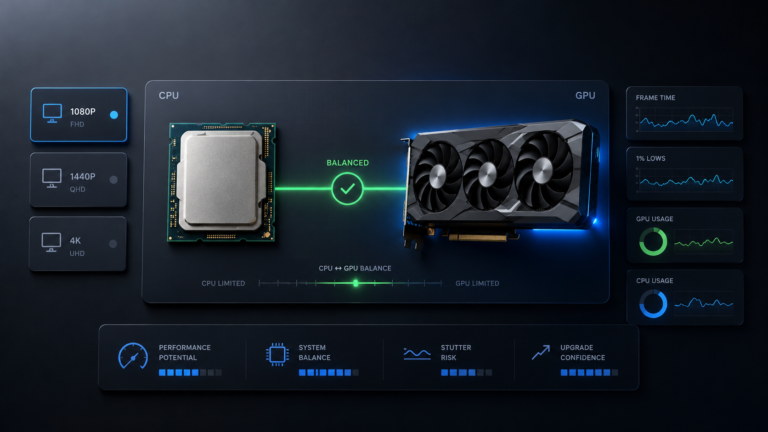
Before spending money, compare your current CPU and your upgrade option at the same resolution. A CPU that looks weak at 1080p may be acceptable at 1440p or 4K. A CPU that looks fine in AAA games may still struggle in esports titles at very high refresh rates.
Use the main BottleneckLab tool to test your CPU-GPU balance with the RTX 4080, then compare the result against your target resolution and refresh rate.
Real-World RTX 4080 CPU Pairing Examples
RTX 4080 + Ryzen 5 5600
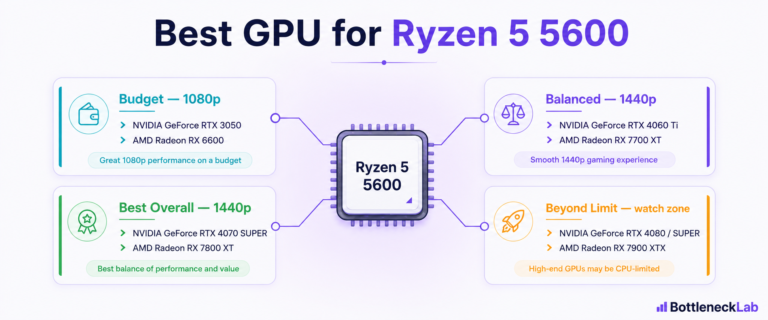
The Ryzen 5 5600 can still work with the RTX 4080, especially at 1440p in GPU-heavy games. If you already own an AM4 build, this pairing may be acceptable while you plan a smarter upgrade.
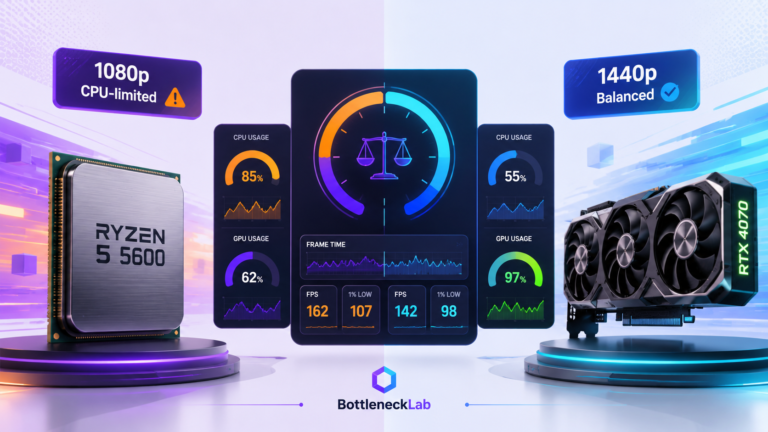
At 1080p high refresh rates, the Ryzen 5 5600 is more likely to limit the RTX 4080. If you see low GPU usage and busy CPU threads, try free fixes first: enable XMP, confirm dual-channel RAM, update BIOS, and enable Resizable BAR. If the limit remains, a 5700X3D or 5800X3D can be a cost-effective AM4 path.
RTX 4080 + Ryzen 7 7800X3D
This is the cleanest gaming-focused pairing. The 7800X3D gives the RTX 4080 enough CPU headroom for 1080p high refresh gaming and strong 1440p performance. At 4K, the GPU usually becomes the main limit, but the CPU still helps with consistency in CPU-sensitive scenes.
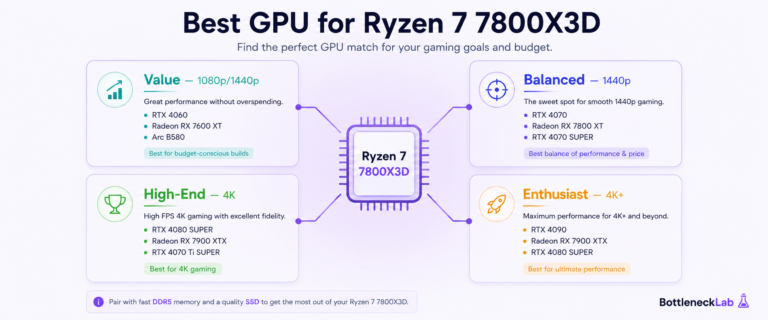
Building around AMD’s strongest gaming CPUs? Compare GPU tiers in our best GPU for Ryzen 7 7800X3D guide.
If your priority is gaming smoothness rather than heavy productivity, this is the CPU most RTX 4080 buyers should compare against first.
RTX 4080 + Core i5-12400F
The Core i5-12400F is a capable budget CPU, but it is not ideal for every RTX 4080 scenario. At 1440p in GPU-heavy AAA games, it can still deliver a good experience. At 1080p high refresh rates, it is more likely to become the ceiling.
This is a borderline pairing. It is acceptable if you already own it and play at 1440p, but not the CPU I would choose for a fresh RTX 4080 build focused on high refresh competitive gaming.
Frequently Asked Questions
Is Ryzen 5 enough for RTX 4080?
Yes, a modern Ryzen 5 can be enough for RTX 4080 gaming at 1440p and 4K, especially in GPU-heavy AAA titles. The Ryzen 5 7600 is a reasonable value pairing for many builds. At 1080p high refresh rates, however, a Ryzen 5 can become the limit sooner because the GPU is waiting for the CPU to prepare frames.
Does RTX 4080 bottleneck at 1080p?
The RTX 4080 itself is usually not the bottleneck at 1080p. The more common issue is that the GPU is so fast that the CPU becomes the limit. If you play esports titles at 144Hz, 240Hz, or higher, you need a strong CPU to keep the RTX 4080 fed.
Do I need Ryzen 7 for RTX 4080?
You do not always need a Ryzen 7 for RTX 4080. For 1440p AAA gaming or 4K gaming, a modern Ryzen 5 or Core i5 can be enough. A Ryzen 7 X3D processor, such as the 9800X3D or a well-priced 7800X3D, makes more sense if you play CPU-sensitive games, target high refresh rates, or want stronger long-term gaming headroom.
Is Core i5 enough for RTX 4080?
A newer Core i5 can be enough for RTX 4080 gaming at 1440p and 4K. The Core i5-13600K is a strong value option. Older i5 chips, such as the i5-12400F, can still work in GPU-heavy games but may limit performance at 1080p high refresh rates.
What CPU avoids RTX 4080 bottleneck?
The Ryzen 7 9800X3D is one of the strongest gaming-first choices for reducing CPU-side limits with the RTX 4080, while the 7800X3D remains a capable alternative when current pricing is better. For 1440p and 4K, a Ryzen 5 7600, Ryzen 5 7600X, or another strong modern mid-range CPU can also be enough in many games. Resolution, refresh rate, RAM, settings, and game engine matter.
Is RTX 4080 overkill for 1080p?
For normal 1080p 60Hz or 144Hz AAA gaming, the RTX 4080 is usually more GPU than you need. For 240Hz or 360Hz competitive gaming, it can make sense if paired with a very strong CPU. The key is matching the GPU to your monitor and game type.
Should I upgrade CPU for RTX 4080?
Upgrade only if you have clear signs of a CPU limit. Low GPU usage, maxed CPU threads, uneven frame times, and weak 1080p high refresh performance are common signals. If your GPU usage is high and gameplay feels smooth, a CPU upgrade may bring only a small visible improvement.
Final Verdict: Best CPU for RTX 4080
For a new gaming-focused RTX 4080 build, compare the Ryzen 7 9800X3D first. The Ryzen 7 7800X3D remains a strong alternative when its current total platform cost is clearly lower. For 1440p AAA and 4K gaming, a Ryzen 5 7600 or Ryzen 5 7600X can be the better value because the GPU usually does most of the work. For gaming mixed with heavier productivity and background workloads, compare the Intel Core Ultra 7 270K Plus.
Before upgrading, check your actual CPU-GPU balance, enable XMP or EXPO, confirm dual-channel RAM, and update your BIOS. The best CPU is the one that matches your resolution, refresh rate, and workload without wasting budget.