This is a 1440p-specific guide for interpreting bottleneck results. The actual calculator stays on the BottleneckLab homepage. At 1440p, the GPU handles much more rendering work than at 1080p, so a small GPU-side limit is often normal instead of a problem.
A bottleneck calculator 1440p result usually leans more toward the GPU than the same build at 1080p. That is normal. 1440p pushes more pixels per frame, which keeps the GPU busier and gives the CPU more breathing room between frame submissions.
Quick 1440p Bottleneck Comparison
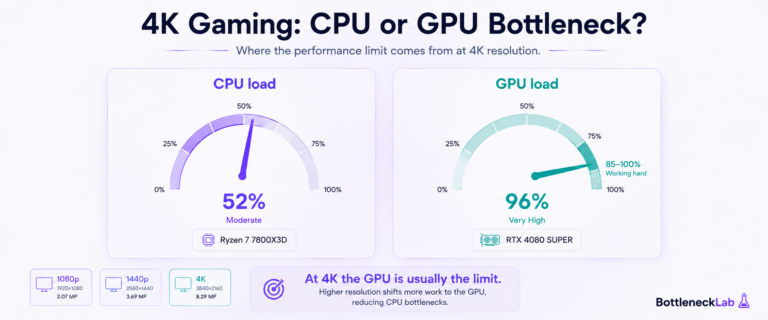
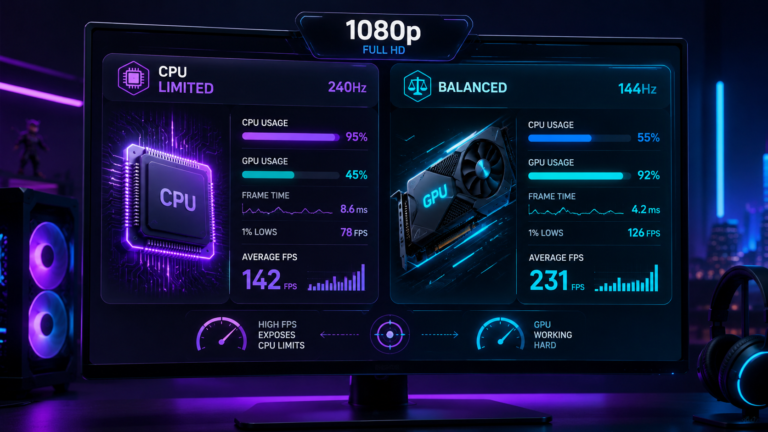
Resolution changes how the CPU and GPU share work. At 1080p, the GPU can finish frames quickly, so the CPU often becomes the pacing component at high FPS. At 1440p, the GPU has more rendering work. At 4K, the GPU usually becomes the clear limit.
Moving beyond 1440p? Read the 4K gaming bottleneck guide to understand why 4K usually shifts more pressure to the GPU.
| Resolution | Common limit | What it means |
|---|---|---|
| 1080p | CPU can appear more limiting | The GPU finishes frames quickly, so the CPU has to prepare frames faster. |
| 1440p | More balanced, often GPU-leaning | The GPU renders more pixels, so CPU-only bottlenecks are less common. |
| 4K | Mostly GPU-limited | The GPU is busy with very heavy pixel and shader work. |
A small GPU bottleneck at 1440p is usually healthy. It often means the graphics card is doing the job you paid for. The result becomes a real problem only if FPS, frame time, VRAM usage, or settings targets do not match your expectations.
Why 1440p Creates a More Balanced CPU-GPU Load
1440p is often called the gaming sweet spot because it increases visual detail without pushing the GPU as hard as 4K. Compared with 1080p, 2560×1440 has about 78% more pixels per frame. That extra rendering work keeps the GPU busier and gives the CPU more time between frame submissions.
This is why a build that looks CPU-limited at 1080p may look balanced at 1440p. The CPU did not suddenly become faster. The workload shifted. The GPU has more to render, so the system becomes less dependent on the CPU preparing frames as quickly.
For a current RTX 50-series example, read our best CPU for RTX 5070 and RTX 5070 Ti guide, where we break down why 1440p often lets buyers save money on the CPU.
Planning a 1440p build with a mid-range RTX card? Read our best CPU for RTX 5060 Ti guide to see why the 16GB version may give more VRAM headroom than the 8GB model.
At 1080p
The GPU finishes frames quickly. High refresh rates can expose CPU game-thread limits, RAM speed problems, or background-app pressure.
At 1440p
The GPU takes on more rendering work. CPU and GPU load often become healthier and more evenly distributed.
At 4K
The GPU is usually the clear ceiling. CPU upgrades often matter less unless the game engine itself is heavily CPU-bound.
For more background on the calculation logic, read our guide on how CPU and GPU balance is estimated. For the lower-resolution comparison, see why 1080p results often look CPU-heavy.
CPU Requirements for 1440p Gaming
The GPU carries more weight at 1440p than it does at 1080p, but the CPU still matters when your FPS target rises. A 60 FPS target is forgiving. A 144Hz target needs better CPU pacing. A 240Hz esports target can bring CPU game-thread speed back into the spotlight.
1440p 60 FPS gaming
A modern six-core CPU such as a Ryzen 5 5600 or Intel Core i5-12400F is usually enough. The GPU is the natural limit in most AAA games.
1440p 144 FPS gaming
CPU quality starts to matter more. CPU-heavy games, open-world titles, and simulation games can expose older processors.
High-refresh esports at 1440p
At very high FPS targets, CPU throughput and frame-time consistency matter again, especially in competitive games.
| Target at 1440p | CPU tier | What usually limits it |
|---|---|---|
| 60 FPS | Modern six-core CPU | GPU render throughput in most games |
| 144 FPS | Strong six-core or eight-core CPU | GPU in AAA games, CPU in CPU-heavy scenes |
| 240 FPS esports | High-IPC gaming CPU | CPU game-thread speed and frame-time consistency |
If you confirm CPU-side pressure through monitoring, use our guide to fix a confirmed CPU bottleneck before buying new hardware.
GPU Requirements for 1440p Gaming
At 1440p, the graphics card usually has the bigger job. It has to render more pixels, handle shaders, textures, post-processing, shadows, anti-aliasing, and sometimes ray tracing. This is why GPU choice often matters more than CPU choice for 1440p AAA gaming.
Ultra settings vs high settings
Ultra settings can add heavy GPU load without always giving a visible improvement that matches the performance cost. Shadow quality, ambient occlusion, volumetric effects, and heavy anti-aliasing are common places to recover performance first.
Ray tracing at 1440p
Ray tracing can push a balanced 1440p build into GPU-limited territory. Before upgrading hardware, test upscaling and ray-tracing settings. NVIDIA’s DLSS, AMD FSR, and Intel XeSS can help reduce native rendering pressure while preserving image quality in supported games.
For supported NVIDIA GPUs and games, see NVIDIA’s official DLSS technology page.
VRAM requirements at 1440p
For 1440p, 8GB VRAM can still work with settings control, but 12GB is a more comfortable target for current AAA games at high settings. 16GB gives stronger headroom for ultra textures, ray tracing, and future releases.
| GPU tier | Typical 1440p target | Notes |
|---|---|---|
| RTX 4060 / RX 7600 class | 60 FPS with settings control | Playable, but 8GB VRAM can limit ultra textures in newer AAA titles. |
| RTX 4070 / RX 7800 XT class | High refresh with good settings | Strong 1440p tier. 12GB VRAM is more comfortable for current games. |
| RTX 4070 Ti Super / RX 7900 XT class | 144Hz, ultra, stronger longevity | Better for high settings, ray tracing with upscaling, and larger VRAM needs. |
| RTX 4080 Super / RX 7900 XTX class | High-end 1440p or future 4K | Often more than needed for 1440p unless using ray tracing, 165Hz+, or future 4K. |
If GPU usage is high and FPS is below your target, compare your symptoms with how to diagnose a GPU-side limit.
For very fast GPUs, 1440p is not always fully GPU-limited, especially in high-refresh or CPU-sensitive games. If you are using Nvidia’s higher-end card, read our RTX 4080 CPU pairing at 1440p guide before choosing a processor.
Best CPU-GPU Pairings for 1440p
The best 1440p pairings usually spend more budget on the GPU than the CPU. That does not mean the CPU does not matter. It means the GPU is more often the part setting frame rate and visual-quality limits at this resolution.
| Pairing | Best target | What to expect |
|---|---|---|
| Ryzen 5 5600 + RTX 4060 | 1440p 60Hz | CPU is fine. GPU and 8GB VRAM are the main limits in newer games. |
| i5-12400F + RTX 3060 Ti | 1440p 60 to 90 FPS | Good budget balance. GPU is usually the limit. |
| Ryzen 5 7600 + RTX 4070 | 1440p high refresh | Strong mid-range balance. CPU is rarely the issue in AAA games. |
| i5-13600K + RTX 4070 Super | 1440p 144Hz | Good CPU headroom for higher FPS and CPU-heavy scenes. |
| Ryzen 7 7800X3D + RTX 4070 Ti Super | 1440p ultra and esports | Excellent frame-time consistency and strong 1440p headroom. |
For a real RTX 4070 example, see our Ryzen 5 5600 and RTX 4070 at 1440p guide. If you are choosing a new CPU around that GPU tier, our guide to choose a CPU for RTX 4070 by resolution can help you avoid overbuying or underbuying.
For Intel budget builders, we also have a focused guide on i5-12400F and RTX 4070 at 1440p, including when the pairing is balanced and when high-refresh targets make the CPU more visible.
How to Read 1440p Bottleneck Results
When you run a 1440p check, remember that the result is not a panic signal. It is a direction. The best interpretation comes from combining the result with real gameplay monitoring, GPU usage, per-core CPU usage, frame time, VRAM usage, and your target refresh rate.
Balanced result at 1440p
A balanced result is ideal. It usually means neither the CPU nor the GPU has a severe mismatch for the selected resolution. At 1440p, a slight GPU lean is normal and usually healthy.
CPU bottleneck at 1440p
A CPU bottleneck at 1440p matters more when you target high FPS, play CPU-heavy games, or see weak 1% lows and frame-time spikes. Before upgrading, check XMP or DOCP, background apps, thermal throttling, and per-core usage.
GPU bottleneck at 1440p
A GPU bottleneck at 1440p is often expected in AAA games. Lowering GPU-heavy settings, using DLSS, FSR, or XeSS, and checking VRAM pressure should come before a hardware upgrade.
Example: A Ryzen 5 5600 with an RTX 4070 may look more CPU-sensitive at 1080p high FPS, but at 1440p the RTX 4070 usually takes on more of the rendering load. That shift can make the same build feel much more balanced.
Test Your 1440p CPU-GPU Balance
Run your CPU and GPU at 1440p, then compare the result with GPU usage, CPU per-core usage, VRAM, frame time, and your monitor refresh-rate target.
Test your 1440p CPU-GPU balance →Common 1440p Bottleneck Mistakes
- Buying too little GPU for a 144Hz target. A 60 FPS GPU will not suddenly feel like a 144Hz GPU because the monitor supports it.
- Overbuying CPU while the GPU is already maxed out. If GPU usage is near full, a CPU upgrade may not improve FPS.
- Ignoring VRAM. 8GB can still work, but 12GB is a more comfortable modern target for 1440p AAA games.
- Leaving RAM at default speed. Enable XMP or DOCP before blaming the CPU.
- Ignoring laptop GPU power limits. A laptop GPU name does not always equal desktop GPU performance because TGP matters.
- Judging by average FPS only. Frame time and 1% lows often reveal the real problem.
Final 1440p Bottleneck Verdict
1440p is where many gaming PCs find their healthiest CPU-GPU balance. The GPU takes on more rendering work than at 1080p, which reduces CPU-only bottlenecks and makes GPU choice more important for AAA games, ray tracing, and high settings.
For 1440p 60Hz, a modern six-core CPU is usually enough and GPU choice matters more. For 1440p 144Hz, CPU quality starts to matter in demanding games. For 1440p 240Hz esports, CPU frame pacing becomes important again.
The best upgrade is the one your monitoring data supports. If GPU usage is high, reduce GPU-heavy settings or upgrade GPU. If GPU usage drops during stutter while one CPU core is maxed, investigate CPU, RAM, thermals, and background apps first.
Frequently Asked Questions
Is CPU important for 1440p gaming?
Yes, but less than at 1080p for most games. At 1440p 60 FPS, a modern six-core CPU is usually enough because the GPU is doing more of the rendering work. At 144Hz or higher, CPU quality matters more, especially in open-world, simulation, strategy, and esports titles where frame pacing and 1% lows become more sensitive.
Is 1440p CPU-bound or GPU-bound?
1440p is usually more GPU-bound than 1080p, especially in demanding AAA games at high or ultra settings. Competitive esports titles can still become CPU-sensitive at very high FPS, but the average 1440p gaming build leans more toward GPU load than CPU load.
Is a 10% bottleneck bad at 1440p?
Usually not. A small bottleneck estimate at 1440p often means one part has slightly more headroom than the other. If frame time is stable, GPU usage is healthy, and the game feels smooth, a small percentage is not a real problem. It matters more if you see stuttering, weak 1% lows, or low GPU usage during FPS drops.
What is the best CPU for 1440p gaming?
For 1440p 60Hz, a modern six-core CPU is usually enough. For 1440p 144Hz, a stronger six-core or eight-core CPU such as a Ryzen 5 7600 or Intel Core i5-13600K class chip is a better match. For high-FPS esports, CPUs with strong game-thread performance and cache, such as X3D chips, can improve 1% lows.
Can GPU bottleneck the CPU at 1440p?
Yes. If the GPU is too busy rendering 1440p frames, the CPU may finish its work early and wait. This is common in AAA games and is not automatically bad. It usually means the GPU is the performance ceiling. Lowering GPU-heavy settings or using upscaling can help before you consider a GPU upgrade.
Is the RTX 4060 good for 1440p gaming?
The RTX 4060 can work at 1440p with settings control, but it is not the ideal 1440p high-refresh card. Its 8GB VRAM can become limiting in newer AAA games at high texture settings. For 1440p 60Hz it can be functional, but for 1440p 144Hz, an RTX 4070-class GPU is usually a better fit.
Should I upgrade my CPU for 1440p gaming?
Check GPU usage first. If GPU usage is near full and CPU usage is comfortable, a CPU upgrade will probably not improve FPS much. If GPU usage drops during stutter while one CPU core is heavily loaded, the CPU or RAM setup may be the issue. Enable XMP or DOCP, check thermals, and monitor frame time before upgrading.