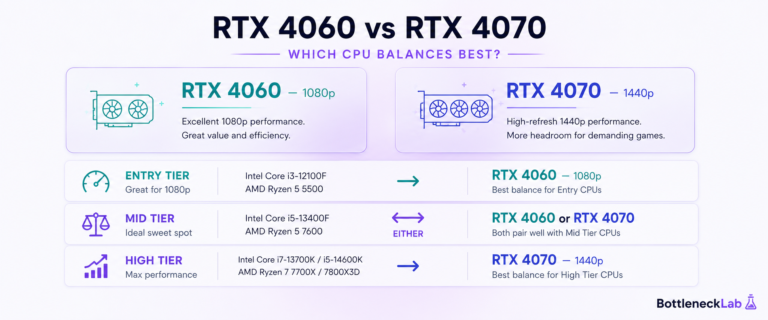
The best CPU for RTX 4070 depends on your resolution, refresh rate, current platform, and upgrade budget. A budget CPU can be enough for 1440p gaming, while 1080p high-refresh gaming benefits from a stronger processor with better frame-time consistency.
For most RTX 4070 builds, Intel Core i5-12400F is the best budget 1440p pick, Ryzen 7 5700X3D is the best AM4 gaming upgrade if available at a fair price, Intel Core i5-13600K is strong for 1080p high refresh rate, and Ryzen 7 7700X makes sense for a new AM5 platform.
If you are wondering what CPU should I pair with RTX 4070, do not start with the processor name first. Start with your target resolution. At 1080p, the CPU has to prepare more frames per second. At 1440p, the GPU takes on more rendering work. That is why the same RTX 4070 can feel CPU-limited in one setup and well balanced in another.
You can also check your CPU-GPU balance before spending money, especially if you already own a usable CPU and want to know whether an upgrade is actually worth it.
Best CPUs for RTX 4070 to Buy by Use Case
For most buyers, the right CPU depends more on the current platform and target frame rate than on buying the fastest processor. The Core i5-12400F is the budget 1440p path, the Ryzen 7 5700X3D is the strongest practical AM4 upgrade, the Core i5-13600K suits high-refresh Intel builds, and the Ryzen 7 7700X fits a new AM5 system.
Intel Core i5-12400F
A cost-controlled RTX 4070 pairing for 1440p gaming when the graphics card is expected to carry most of the rendering workload.
Choose it when: you want a lower-cost 1440p gaming build and do not need extreme competitive frame rates.
Skip it when: your main target is 1080p at 240Hz or you regularly combine gaming with heavier CPU workloads.
Verify the exact i5-12400F model, condition, seller, warranty, and delivery terms on Amazon.
AMD Ryzen 7 5700X3D
The most practical gaming-focused upgrade here for users who already own a compatible AM4 motherboard and DDR4 memory.
Choose it when: you want stronger CPU-sensitive gaming, 1% lows, and frame-time consistency without replacing the AM4 platform.
Skip it when: the CPU price approaches the cost of a more flexible new platform or your motherboard lacks BIOS support.
Verify the exact Ryzen 7 5700X3D model, condition, seller, warranty, and delivery terms on Amazon.
Intel Core i5-13600K
A stronger fit for 1080p high-refresh gaming, streaming, recording, productivity, and heavier multitasking alongside gaming.
Choose it when: higher frame-rate targets, streaming, recording, or productivity justify more CPU headroom than a standard 1440p build needs.
Skip it when: the extra motherboard, cooling, and power cost does not solve a real performance target.
Verify the exact i5-13600K model, condition, seller, warranty, and delivery terms on Amazon.
AMD Ryzen 7 7700X
A new-build choice for buyers who want DDR5, an AM5 motherboard, strong high-frame-rate headroom, and a longer AMD platform path.
Choose it when: you are building a new AMD system and value platform flexibility, gaming performance, and extra multitasking headroom.
Skip it when: you already own a capable AM4 or LGA1700 system and the full motherboard, DDR5, and cooling cost is not justified.
Verify the exact Ryzen 7 7700X model, condition, seller, warranty, and delivery terms on Amazon.
Amazon availability, seller, product condition, warranty, shipping, and marketplace destination can vary by visitor location. Confirm the exact model before completing the order.
Best Budget CPU for RTX 4070
The best budget CPU for RTX 4070 is usually the Intel Core i5-12400F, especially for a cost-conscious 1440p gaming build. According to the official Intel Core i5-12400F specifications, it has 6 cores, 12 threads, DDR4 or DDR5 memory support, and enough gaming headroom for the RTX 4070 when the GPU is doing most of the work.
At 1440p, the RTX 4070 is often the main performance limit in visual-heavy games. That means the i5-12400F can keep the build balanced without forcing you to overspend on the CPU. At 1080p high-refresh gaming, stronger CPUs start to show their advantage, but the i5-12400F is still a sensible entry point if budget matters.
Does the RTX 4070 Need a Powerful CPU?
The RTX 4070 does not need an extreme CPU, but it does need a processor that can feed frames consistently. Before the GPU renders a frame, the CPU handles game logic, physics, AI, draw calls, network updates, and background processes. If the CPU cannot prepare frames fast enough, the GPU waits.
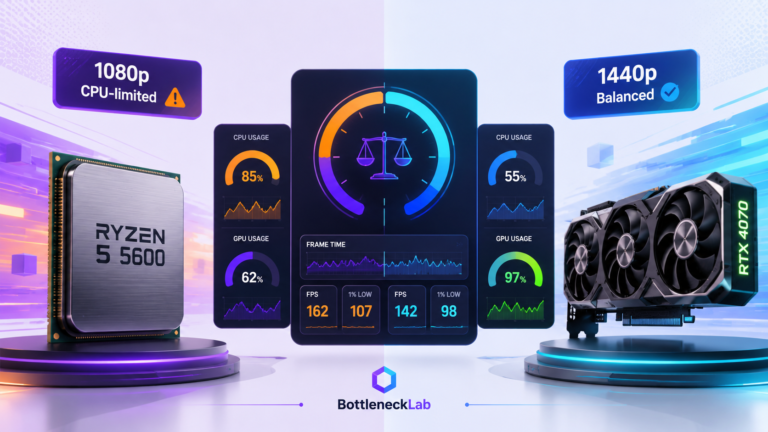
That waiting is what an RTX 4070 CPU bottleneck looks like in real gameplay: GPU usage is lower than expected, FPS stops scaling, frame time becomes uneven, and 1% lows feel worse than the average FPS suggests.
This is also why bottleneck calculators and real-world tests can look different. A CPU that is fine at 1440p can still limit performance at 1080p high refresh rate. If you want to read bottleneck results without overreacting, the key is to compare the estimate with resolution, game type, RAM setup, and real monitoring data.
Best CPU for RTX 4070 by Budget Tier
The CPU tiers below are built around real buying decisions, not just benchmark charts. Instead of pretending every pairing has a perfect percentage, the table explains where each CPU makes sense and when you should step up.
Intel Core i5-12400F
Best for affordable 1440p gaming where the RTX 4070 does most of the work.
Ryzen 5 5600X
Good for existing AM4 users, but not the strongest upgrade if you already own a Ryzen 5 5600.
Ryzen 7 5700X3D
Best AM4 gaming pick if available at a fair price, especially for stronger 1% lows.
i5-13600K / Ryzen 7 7700X
Better for 1080p high refresh rate, streaming, productivity, or a newer platform.
Budget Tier: Intel Core i5-12400F
The Intel Core i5-12400F is the easiest budget recommendation for an RTX 4070 build focused on 1440p gaming. It is not the fastest CPU here, but it avoids the common mistake of overspending on the processor when the RTX 4070 is already the main limiter at higher visual settings.
Choose it if your goal is a clean 1440p gaming PC with DDR4 memory and a sensible platform cost. Avoid it if your main target is 1080p 240Hz competitive gaming, where CPU speed and frame-time consistency matter more.
If you are specifically considering this budget CPU with the RTX 4070, read our full i5-12400F and RTX 4070 bottleneck behavior breakdown before deciding whether a CPU upgrade is actually needed.
Value Tier: Ryzen 5 5600X
The Ryzen 5 5600X remains a practical value CPU for RTX 4070 if you already like the AM4 platform or can find it at a strong price. It has 6 cores, 12 threads, strong Zen 3 single-core performance, and 32MB of L3 cache.
For 1440p AAA gaming, it is usually enough. For 1080p high-refresh gaming, it can show CPU-side pressure in competitive or CPU-heavy games. If you already own a Ryzen 5 5600, the 5600X is not a meaningful upgrade. In that case, the Ryzen 7 5700X3D is the smarter AM4 step if pricing and availability make sense.
Real pairing example: If you want to see how a similar AM4 chip behaves with this GPU, read our Ryzen 5 5600 and RTX 4070 pairing test. It shows why the same setup can look CPU-limited at 1080p high FPS but much healthier at 1440p.
High Performance Tier: Ryzen 7 5700X3D
The Ryzen 7 5700X3D is the strongest practical AM4 gaming recommendation for RTX 4070 users when it is available at a fair price. Its 3D V-Cache helps in many cache-sensitive games, and that can improve frame-time consistency, 1% lows, and CPU-limited performance.
This CPU makes the most sense if you already have an AM4 motherboard and DDR4 RAM. It lets you extend the life of the platform without buying a new motherboard or DDR5 memory. Because availability can vary, compare the 5700X3D price with newer AM5 options before buying.
Enthusiast Tier: Intel Core i5-13600K or Ryzen 7 7700X
The Intel Core i5-13600K is a strong option if you want high-refresh 1080p gaming, streaming, background task headroom, and strong productivity performance. Its performance cores handle game threads, while efficient cores help with background workloads.
The Ryzen 7 7700X is the AM5 option for users who want a newer AMD platform, DDR5 memory, and future upgrade flexibility. It is not required for every RTX 4070 build, but it makes sense if you are building new and want a longer platform path.
If you are stepping beyond the RTX 4070 class, the CPU decision changes because a faster GPU can expose weak processors more easily at high refresh rates. For that scenario, see our guide on choosing a CPU for a higher-end RTX 4080 build.
| CPU | Platform | Best use case | 1080p behavior | 1440p behavior |
|---|---|---|---|---|
| Intel Core i5-12400F | LGA1700 / DDR4 or DDR5 | Budget 1440p gaming | Can show limits in high-FPS games | Usually balanced enough |
| Ryzen 5 5600X | AM4 / DDR4 | Value AM4 builds | Good, but not ideal for extreme FPS | Strong value pairing |
| Ryzen 7 5700X3D | AM4 / DDR4 | Best AM4 gaming upgrade if priced fairly | Strong for 1% lows and CPU-heavy games | Excellent balance |
| Intel Core i5-13600K | LGA1700 / DDR4 or DDR5 | High-refresh gaming and productivity | Very strong | More CPU than most RTX 4070 users need |
| Ryzen 7 7700X | AM5 / DDR5 | New AM5 build | Strong for high FPS | Excellent, with future platform headroom |
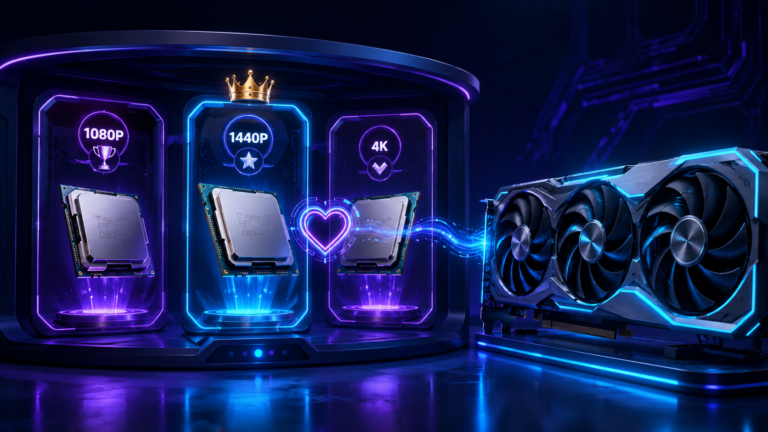
Why Resolution Changes the Best CPU for RTX 4070
Resolution is the part many CPU pairing guides explain poorly. It does not only change image sharpness. It changes which part of the PC controls your frame rate.
1080p
The RTX 4070 renders frames quickly, so the CPU has to feed frames quickly. This is where weak CPUs, slow RAM, or background apps are easier to notice.
1440p
The GPU has more rendering work per frame. This gives the CPU more breathing room and makes budget or mid-range CPUs more acceptable.
4K
The GPU is usually the clear limit. CPU differences matter less unless the game engine itself is very CPU-heavy.
For most RTX 4070 owners, 1440p is the sweet spot. The card is strong enough for high-quality 1440p gaming, and the CPU does not need to be extreme unless you also care about very high refresh rates, competitive games, streaming, or productivity.
If you are trying to understand this from a real pairing angle, our guide on how CPU and GPU balance is estimated explains why the result changes when workload, resolution, and frame target change.
Recommended RTX 4070 Build Examples
Budget Build: Intel Core i5-12400F + RTX 4070
This is the best low-cost route if your target is 1440p AAA gaming. Use 16GB or 32GB dual-channel DDR4, enable XMP, and keep background apps under control. The RTX 4070 will usually be the part doing the heavier work at this resolution.
Best for: 1440p gaming, sensible budgets, and users who do not need 240Hz competitive performance.
Balanced Build: Ryzen 7 5700X3D + RTX 4070
This is the best AM4 gaming combination in this guide if the chip is available at a fair price. It keeps platform cost lower for existing AM4 users while improving CPU-sensitive performance, 1% lows, and frame-time consistency.
Best for: users who play both 1440p AAA games and 1080p competitive games.
High-FPS Build: Intel Core i5-13600K + RTX 4070
This pairing is best if you care about 1080p high refresh rate, streaming, recording, or productivity alongside gaming. It is stronger than most RTX 4070 users need for 1440p alone, but the extra CPU headroom can be useful.
Best for: 240Hz gaming, multitasking, and users who want a stronger all-round CPU.
New Platform Build: Ryzen 7 7700X + RTX 4070
The Ryzen 7 7700X makes sense when you are building new and want an AM5 system with DDR5 memory. It is fast enough for high FPS and gives you a stronger future upgrade path than AM4.
Best for: new AMD builds, DDR5 users, and buyers who want a longer platform path.
Before You Upgrade Your CPU for RTX 4070
Before buying a new processor, check the free and low-cost things that can make an RTX 4070 build feel worse than it really is. Many users blame the CPU when the real issue is RAM configuration, BIOS settings, drivers, thermals, or background apps.
Planning a newer RTX 50-series build instead? Read our best CPU for RTX 5070 and RTX 5070 Ti guide before choosing your next processor.
Enable XMP or DOCP
Your RAM may run at a slow default speed until XMP or DOCP is enabled in BIOS. This matters more in CPU-limited games.
Use dual-channel RAM
Two matched sticks in the correct slots can improve frame-time consistency and 1% lows compared with single-channel memory.
Check Resizable BAR
Resizable BAR can help in some supported games, but it is not guaranteed. Treat it as a free setting to test.
Update drivers
GPU drivers, chipset drivers, and BIOS updates can affect stability, boost behavior, and game performance.
Watch temperatures
Thermal throttling can look like a bottleneck. Check CPU temperature, GPU temperature, and clock speed during gameplay.
Close background apps
Browsers, overlays, recording tools, launchers, and RGB software can steal CPU time and hurt frame pacing.
If your monitoring shows high CPU pressure, low GPU usage, stuttering, or weak 1% lows, follow the deeper steps to fix CPU-side performance limits. If your RTX 4070 is already maxed out at higher settings, compare your symptoms with how to diagnose a GPU-side bottleneck.
Final Verdict: What CPU Should You Pair With RTX 4070?
For a budget 1440p RTX 4070 build, choose the Intel Core i5-12400F. For the best AM4 gaming upgrade, choose the Ryzen 7 5700X3D if it is available at a fair price. For 1080p high refresh rate, streaming, or heavier multitasking, choose the Intel Core i5-13600K. For a new AMD platform with DDR5 and future upgrade headroom, choose the Ryzen 7 7700X.
The most important rule is simple: do not overbuy the CPU for 1440p if the RTX 4070 is already the main limit, and do not underbuy the CPU for 1080p high-FPS gaming.
Test your RTX 4070 pairing →Frequently Asked Questions
What is the best CPU for RTX 4070?
The best CPU for RTX 4070 depends on your target. For budget 1440p gaming, Intel Core i5-12400F is a strong value choice. For AM4 gaming, Ryzen 7 5700X3D is the best upgrade if you can find it at a fair price because its 3D V-Cache helps frame-time consistency and 1% lows. For 1080p high refresh rate, Intel Core i5-13600K is stronger. For a new AM5 build, Ryzen 7 7700X gives better platform headroom.
Is the i5-12400F enough for RTX 4070?
Yes, the i5-12400F is enough for RTX 4070 if your main target is 1440p gaming. At that resolution, the RTX 4070 usually does more of the limiting, especially in AAA games at high settings. At 1080p high refresh rate, the i5-12400F can become more noticeable as a CPU limit, so competitive players chasing very high FPS may want a stronger processor.
What is the minimum CPU that makes sense for an RTX 4070?
For a budget 1440p gaming build, the Core i5-12400F is a reasonable minimum starting point for the RTX 4070. A faster CPU becomes more useful for 1080p high-refresh gaming, CPU-heavy simulations, streaming, or targets above 144Hz. Existing Ryzen 5 5600 owners may also keep their platform and test performance before upgrading.
Is Ryzen 7 5700X3D good for RTX 4070?
Yes, Ryzen 7 5700X3D is one of the best AM4 CPUs for RTX 4070 when pricing is reasonable. It is especially useful if you already own an AM4 motherboard and DDR4 RAM. Its 3D V-Cache can help in CPU-sensitive games, improve 1% lows, and reduce frame-time spikes. It is a stronger gaming upgrade than moving from Ryzen 5 5600 to Ryzen 5 5600X.
Does the RTX 4070 Super need a stronger CPU than the RTX 4070?
Not automatically. The RTX 4070 Super has more GPU headroom, so it can expose CPU-side pressure slightly sooner at low resolution and high refresh rates. At 1440p in demanding games, many modern mid-range CPUs remain practical pairings.
Does RTX 4070 need a high-end CPU?
No, the RTX 4070 does not always need a high-end CPU. For 1440p gaming, a good mid-range processor is often enough because the GPU handles more of the workload. A high-end CPU becomes more useful for 1080p high refresh rate, 240Hz gaming, simulation-heavy games, streaming, recording, or productivity while gaming.
What CPU should I pair with RTX 4070 at 1440p?
For 1440p, the Intel Core i5-12400F is the best budget option, Ryzen 5 5600X is a good AM4 value option, Ryzen 7 5700X3D is the best AM4 gaming upgrade if available at a fair price, and Ryzen 7 7700X is a strong AM5 option. You do not need to buy the most expensive CPU if your RTX 4070 is already the main performance limit at 1440p.
What should I check before upgrading my CPU for RTX 4070?
Before upgrading, check XMP or DOCP, dual-channel RAM, Resizable BAR, GPU drivers, chipset drivers, temperatures, background apps, CPU usage per core, GPU usage, frame time, and 1% lows. If the RTX 4070 is already highly used at 1440p, a CPU upgrade may not change much. If GPU usage is low and frame time is unstable, the CPU or memory setup deserves closer attention.